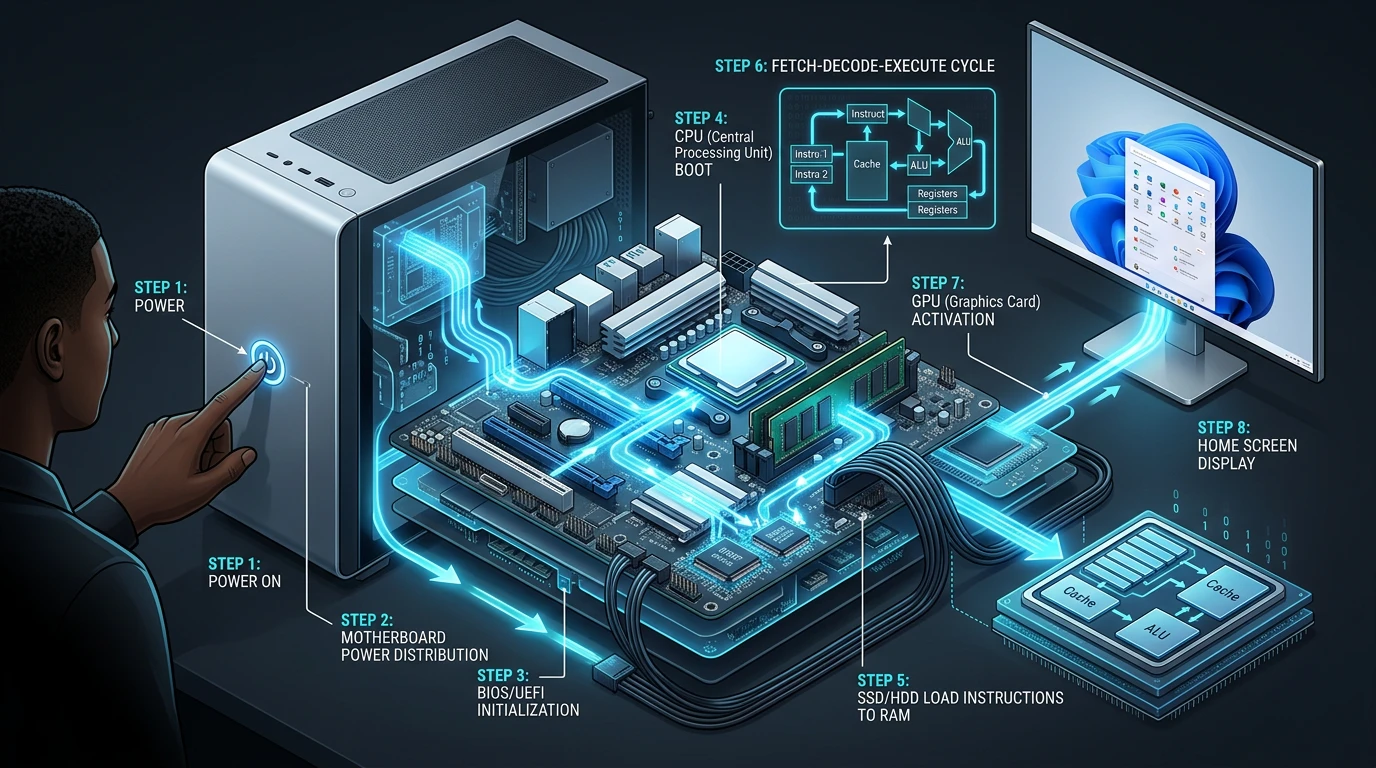
A practical guide to how a computer works, from the power button to the home screen, with clear steps, responsibilities and measurable checkpoints.
This guide turns the topic into concrete decisions, clear responsibilities and measurable checkpoints.
Understand the real need
- Calm the situation before touching the computer
- Diagnose without making the problem worse
- Protect data and accounts before an emergency
- Prepare people before launching a new tool
- Build autonomy without abandoning the user
- When to ask for help instead of forcing the machine
- Key takeaways
- Sources and practical references
Good support resolves the incident and restores the user’s ability to act.
Define a useful objective
When a file refuses to open ten minutes before a meeting, the brain does not want a method; it wants to click everywhere. That reaction is human, but risky. Start by slowing down: name what is blocked, what still works and what the user could lose.
I begin with three questions: “What were you trying to do?”, “What exactly did you see?” and “What changed recently?” These are far more useful than “What did you do this time?”, a sentence capable of turning a technical incident into a courtroom scene. Support should create enough safety for people to describe the facts without fear of being judged.
Record the error message or take a screenshot, note the time, application and latest actions. Then determine whether the issue affects one person, one device, one service or the whole team. That distinction can prevent a complete computer reinstall when the internet provider is having an outage.
Before any risky action, ask: “Are the important files backed up, and can we return to the previous state?”
Observe the context before choosing
A reliable diagnosis moves from the simplest check to the most disruptive action. Observe the connection, power, free storage, devices and exact message. Isolate the possible cause: does it happen in another app, with another account or on another network? Change one thing at a time and record the result.
Restarting is useful because it returns many services to a clean state, but do not erase the clues first. Save open work and capture the error. If the issue returns, the pattern — same time, same file or same update — becomes valuable evidence.
Microsoft provides increasingly significant recovery tools: troubleshooters, Windows Update, safe mode, Startup Repair, System Restore, Reset and reinstall. They do not carry the same risk. Microsoft recommends backing up data before recovery because some options may remove applications, settings or files.
The discipline is simple: one hypothesis, one test, one result. Changing five settings at once may feel energetic, but nobody will know which one solved — or created — the issue. Method looks less heroic and solves the next incident faster.
Organize roles and resources
The most effective support begins before the failure. Identify essential folders, decide where copies are stored and test a restoration. Synchronisation is not always a backup: a deletion or encrypted file can also be synchronised. What matters is having a recoverable copy and knowing who can restore it.
CISA highlights four accessible habits: recognise and report phishing, use strong passwords with a password manager, enable multifactor authentication and keep software updated. They sound basic because they need to become habits, not because they are optional.
Small businesses and associations also need a basic inventory: devices, administrator accounts, licences, owners and renewal dates. Prepare for an employee or volunteer departure as well. Recovering access, transferring documents and closing accounts should not depend on one person’s memory.
- Enable automatic updates where the context allows.
- Protect sensitive accounts with multifactor authentication.
- Never share a code for an action you did not initiate.
- Test the restoration of a file periodically.
- Keep an alternative contact process if the main account is locked.
Move from the idea to a first test
Technology creates stress when people face a new interface, new rules and the fear of slowing down their colleagues all at once. Reduce that pressure by separating the change into three stages: before, during and after.
Before: explain the problem being solved, the tasks that change and those that remain the same. Select pilot users with different confidence levels. Test real scenarios rather than only the perfect demonstration, and prepare a fallback.
During: provide a short “my first three actions” guide, a visible help channel and additional support hours. Leaders must model the change. If a manager quietly keeps using the old private spreadsheet, the team will quickly understand which tool truly matters.
After: observe recurring mistakes, improve the instructions and measure delays, incidents, satisfaction and tasks genuinely simplified. Microsoft’s change guide emphasises the balance among control, training and continuous delivery, along with communication before, during and after changes.
Measure what actually changes
Fixing something remotely in thirty seconds can look efficient, but the same call returns if the user understands nothing. When circumstances allow, explain one useful step: how to recognise the message, check the connection or find the procedure. The goal is not to make everyone a technician. It is to help people handle simple issues and describe the others accurately.
Good documentation fits on one page, uses the user’s language and shows the expected result. Add the update date, owner and support route. After supporting hundreds of users and participating in large deployments, I have found that the best procedures are the ones people actually open — not those that would win a competition for length.
Create a small network of champions too. They test changes, report friction and reassure colleagues. This respects different learning speeds and reduces dependency on a single support team.
Avoid the most common mistakes
Stop experimenting and seek help if you hear an unusual hardware noise, suspect fraud or ransomware, lose access to a critical account, have no backup, see the same failure after several restarts or need to use a reset option. Disconnect the network when compromise is suspected, but do not erase useful evidence.
Prepare the request: goal, symptoms, exact message, time, recent changes, steps already attempted and business urgency. “It doesn’t work” expresses a legitimate feeling; these details turn the feeling into a diagnosis.
Build a sustainable method
- Restore calm before changing the computer.
- Back up data before recovery or reset.
- Test one hypothesis at a time and document the result.
- Prepare adoption before deployment.
- Teach one useful step during every support interaction.
Technology truly serves people when it removes stress instead of adding to it. Your satisfaction will make me happy, and your growing autonomy will be another meaningful victory.
A five-step action plan
“Technology truly serves people when it reduces their stress instead of increasing it.”
Fils Mery MONGO, Managing Director of Agence ALLFORWEB
Let’s grow together
Transformons cette idée en actions utiles
ALLFORWEB vous aide à structurer une démarche claire, adaptée à votre contexte et à vos objectifs.